
My favourite new Squarespace features in 2025
** Sponsored post **
One of the things I love the most about Squarespace is the fact that the platform is constantly evolving. In fact, they add so many new features that often - even as a professional designer - I find it hard to keep up.
This year has been no exception! So in this post, I thought I’d share some of my favourite features that were released in 2025, in case you weren’t aware of them.
Save 10% off your first year’s Squarespace subscription using code CHARLOTTE10
1 New SEO features
These are by far and away the best and most useful features that Squarespace introduced in 2025.
I actually already did a separate blog post just about them - that’s how impressed I was.
How to use Squarespace’s new AI alt text tool →
One of the most mundane parts of building a website is making sure that all the back-end SEO is in place. It’s critical, but, well, rather dull. Especially when it comes to things like adding alt-text to images (which is important so that search engines can ‘read’ what your image is of and understand its context on the page and within your content).
You used to have to go into each image individually to add your alt-text.
But now, Squarespace has a new panel entirely dedicated to SEO - and what they call AIO - ‘AI Optimization’. You can find it under the Website heading (at the moment, but as we know Squarespace likes to move stuff around) under the title SEO/AIO.
Here, you can instantly see your ‘SEO Score’ which tells you how much of your SEO has been completed correctly (please note: this doesn’t tell you how effective your SEO is, just how much of it has been added inside Squarespace).
It basically alerts you to any pages or images that are missing metadata and alt-text.
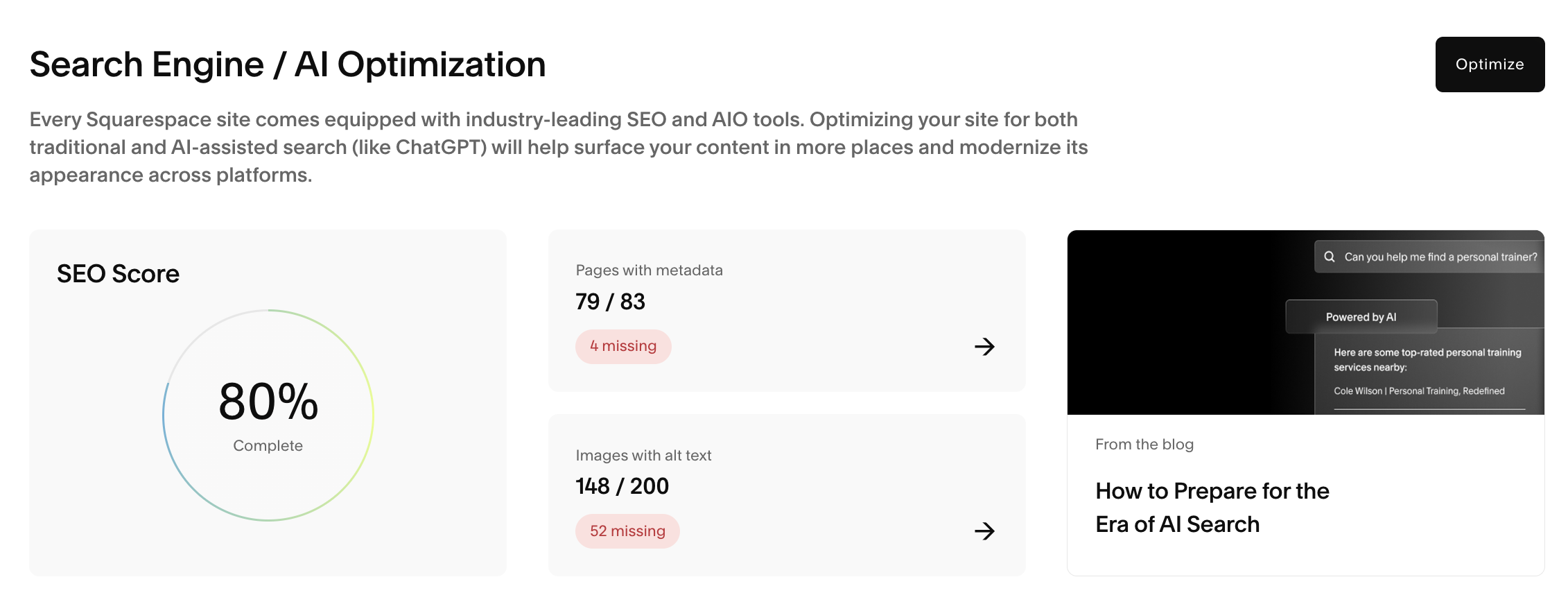
The new SEO panel
This is SO handy. I often find I forget to fill in the alt-text when I’m uploading things quickly - especially to my own website - and regular quick checks of this page make sure I keep on top of this.
Best of all, you can now use Squarespace’s new ‘Beacon AI’ - the built-in AI assistant - to help you generate metadata and alt-text.
This is also a real timesaver. Although I would caveat this by saying that most times when I use it to generate text, I have to tweak it slightly, as it can sound a little robotic or formulaic. But it gives you a good jumping-off point.
And having one place where I can go to finish off all my SEO is so brilliant and has saved me tons of time this year.
2 The ability to upload your own fonts - easily
This year, lots changed with Squarespace when it came to fonts as they streamlined their integrations with some of the big font libraries.
I really love the variety of fonts that Squarespace has available built into the platform - there honestly is a HUGE selection to choose from! But obviously every now and then a client will want something very particular - perhaps their publisher has used a super-specific font on their book cover and they really want to align the website with this.
In these cases, in the old days, I would have to use custom CSS (code) to install these fonts so that they could be used on the website.
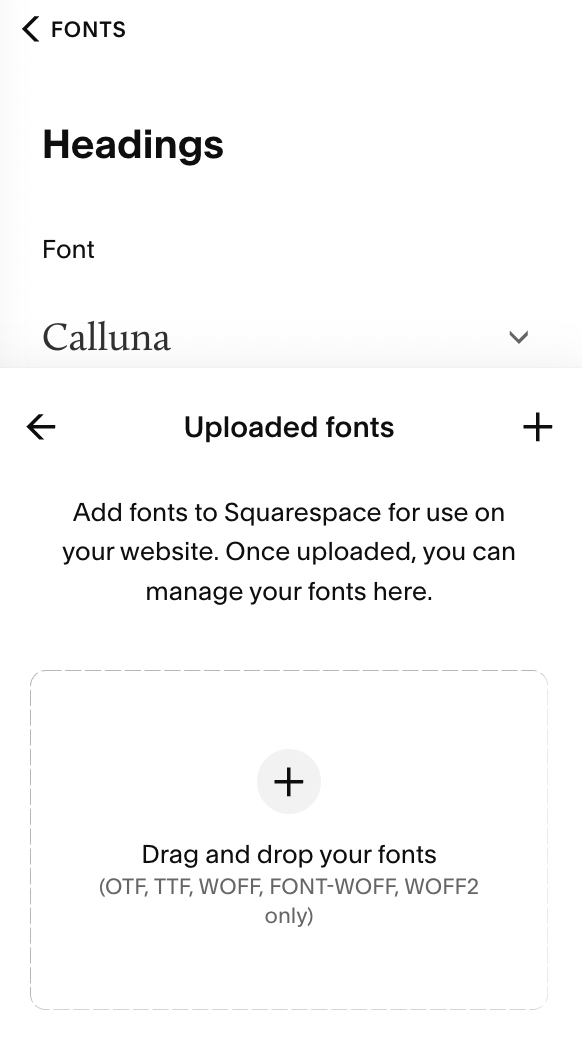
New font upload button!
It was fine - for me - but not so easy for clients to manage themselves.
But now, Squarespace has added an ‘Upload’ button in the Fonts section of the Site Styles panel so you can simply and easily upload your fonts to whichever area you’d like them (Headings, Paragraphs, Buttons etc).
It’s just so easy - this is going to save me lots of time!
3 The ability to easily hide elements on mobile
Again, this is another game changer for me!
After the introduction of Fluid Engine, we were able to create slightly different layouts for desktop and mobile view, which was really useful.
However, there were often times when I used images on the desktop view that looked wrong or superfluous on mobile. Sometimes, design elements that looked great on desktop looked confusing or clunky on mobile.
In these cases, I would have to use code to hide the block from view.
Now, thanks to the new ‘Layers’ panel, I can simply ‘switch off’ elements on a section by using the little eye button.
This has made me very happy!
Christy Price has a great video on how to use this feature:
BUT!
It’s got me thinking. And now on my wishlist… is the ability to be able to hide entire SECTIONS from either mobile or desktop view - that would be another gamechanger.
4 Advanced tools to enhance design flexibility with animation / motion effects
I’ll confess that when it comes to my designs, I am a bit of a less-is-more person. I don’t tend to go in for complicated layouts with lots of moving parts - while I really admire the artistic side of sites that do employ these kinds of effects, I’m also mindful that my author clients need simple sites that serve their readers. And sometimes all the fancy dancing stuff can get in the way 😉
But the fact that there are now more possibilities for design IS super exciting - soon, you will be able to apply transformations to blocks (like rotating them 90 degrees) and individually animate blocks too, along with a ton of other neat effects.
I really like the new animated background feature - which gives the background colour a kind of liquid look - and I’ve used that in a few of my clients’ websites this year. It’s subtle but cool.
Squarespace is calling these pro-level design tools ‘Finish Layer’.
I’m looking forward to taking some time to explore all these new design features in 2026 - watch this space for more info on these.

5. Improved navigation and anchor-link support (on version 7.1 sites)
Last but not least, another really useful 2025 update was the ability to add anchor links more easily - letting visitors jump directly to a specific section of a page.
This is another small-but-mighty change that makes it especially easy if you have a one-page author website.
It means you can add navigation links in the header that jump down to the relevant section on the page, without having to use code blocks.
I’ll be using this all the time when it comes to one-page projects.
Conclusion
So yes, those are my top 5 favourite new features from Squarespace this year. There are a ton more too - including lots of AI features that I haven’t really taken time to explore properly yet.
But you can find out an overview of all the new stuff at the Squarespace Refresh round up here →
I’m looking forward to seeing what new exciting stuff 2026 brings!

Want me to build you a website?
My streamlined yet personal approach, perfected over the past 6 years of building websites for ambitious authors just like you, means I can create your dream author website without overwhelming you with tech jargon or confusing decisions, supporting you throughout the whole process and gently guiding you with my expertise.
Find out more, then get in touch. I would love to hear from you!


